
Server-Side Anticheat by Gamzky
$9.00
Server-side anticheat with 841 blocked models and a built-in ban system
Lifetime updates
Admin menus, ban systems, report tools and the utility scripts that keep a FiveM server upright between restarts. Most menus here bridge ESX, QBCore and Qbox, and the pure utilities run standalone on any build. Every listing shows its dependencies and escrow status up front.
Server-side anticheat with 841 blocked models and a built-in ban system
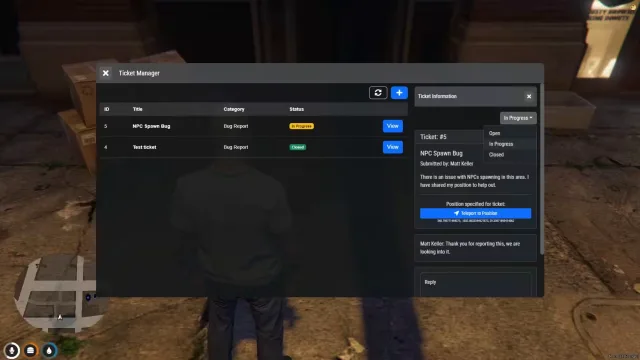
Ticket flow that lives inside the game, not on Discord
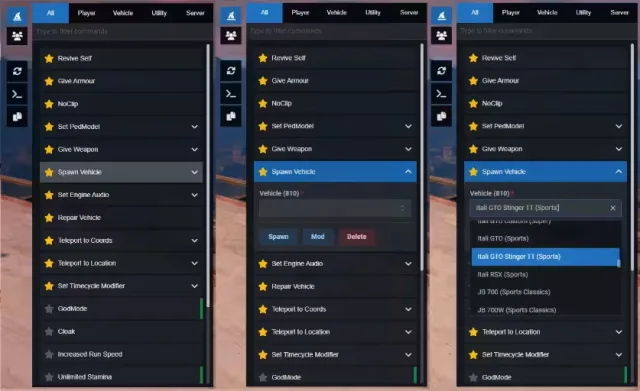
Searchable NUI admin panel where every command lives in JSON
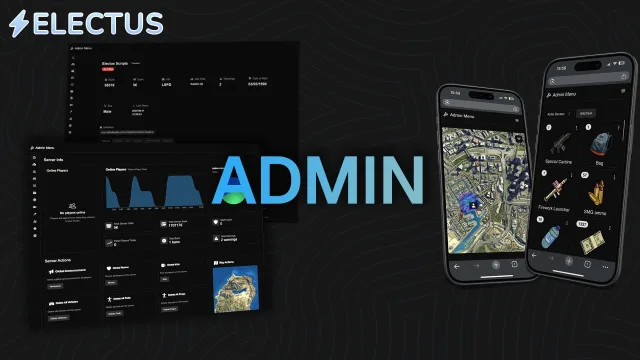
Run your server from a browser tab, no FiveM login needed
Every server owner learns the same lesson in the first month: players find the edge cases, and modders find everything else. Admin and utility scripts are what stand between a good Friday night and a lobby full of flying deer. This category covers the tooling side of running a FiveM server, from full admin menus with spectate, noclip and offline bans to the quieter pieces like Discord logging, whitelist queues, report systems, announcement scripts and restart warnings. None of it shows up in a trailer. All of it decides whether players stay.
txAdmin handles the server itself: restarts, resource management and basic player actions. It was never meant to be your in-city moderation layer. A proper FiveM admin menu adds the things staff actually use during a shift. Teleport to player, freeze, revive, inventory checks, spectate without being seen, and bans that hold license, Discord and hardware identifiers so a cheater cannot walk back in behind a new Steam account. Utility scripts round that out with the plumbing that makes moderation stick: searchable logs, report queues staff can claim, and priority queues so whitelisted players and supporters get in first when the server is full.
Most admin menus in this category ship with bridges for ESX and QBCore, and newer releases support Qbox natively or through its qb compatibility layer. Several lean on ox_lib for menus and callbacks, so read the dependency list and make sure ox_lib starts before anything that needs it. The pure utilities, meaning queues, loggers and announcement systems, are usually standalone and will run on any server build, including custom frameworks.
Installation is the standard drag-and-drop: extract to your resources folder, add the ensure lines in the right order, import any SQL the script ships with, then set up permissions. That last step is where most "the menu will not open" tickets come from. Ace permission scripts need their principals added to server.cfg, and Discord-synced scripts need a bot token plus the role IDs from your guild. Escrow releases keep their config files open, so staff ranks, webhook URLs and ban message text stay editable even when the core code is locked.
Every listing states its framework support, dependencies and escrow status before checkout, so you know whether you are getting open source you can rewrite or protected code with an open config. Files are delivered as soon as payment clears. When a script updates for a new artifact version or a framework change, the new build costs nothing extra. And if something misbehaves in your setup, support comes from the developer who wrote the resource, not a reseller reading the same documentation you are.
Some do and some do not. Full admin menus usually bridge into ESX, QBCore or Qbox so they can touch jobs, money and inventories. Utilities like queues, Discord loggers and announcement scripts are typically standalone. Check the framework line on each listing before buying.
No. txAdmin manages the server process, restarts and resources, while an in-city admin menu handles moderation during play. Most servers run both side by side. Just avoid running two full admin menus at once, because duplicate ban tables and permission systems get messy fast.
Mostly no. Admin menus and ban systems are moderation tools that act after a human makes a call. Some utilities add detection helpers like blacklisted weapon alerts or explosion flags, but they do not replace a dedicated server-side anticheat.
Two common patterns. Ace permissions are defined in server.cfg and work without any external service. Discord role sync reads your guild roles through a bot, which is much easier to manage once your staff team is larger than a handful of people.
A well-built admin menu idles at 0.00ms and only spends frame time while a UI is open. Loggers and queue systems run server side, so they never touch client FPS. A utility showing constant client resmon above 0.05ms while doing nothing is a red flag.
Escrow usually costs less and still keeps configs editable, so ranks, webhooks and ban messages stay in your hands. Open source lets you change ban logic or merge the menu with your own systems. If you have an in-house developer, open source is worth the premium.
Good ban systems support it. Because bans are stored against identifiers in a database rather than applied only to connected players, staff can ban from logs, a web panel or a Discord bot after the fact. Check the product page for offline ban support if that matters to your workflow.