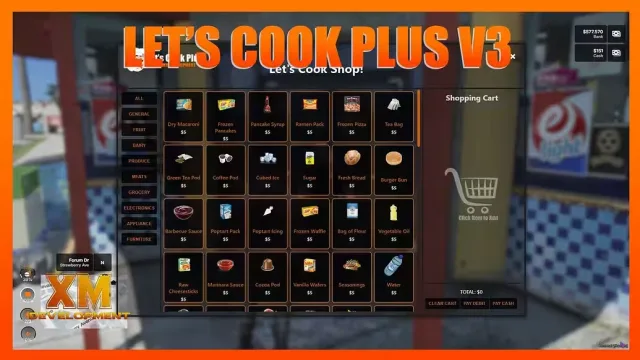
Lets Cook Plus Crafting
$15.00
Cook, distil and craft weapons from any appliance in the world
Lifetime updates
XMMX Development is a small FiveM shop focused on job and gameplay loops that give players something to actually do between calls. The catalog is compact right now, led by Lets Cook Plus, and every script is written to drop into ESX, QBCore or Qbox without a rewrite.
XMMX Development makes FiveM scripts for server owners who want a proper job loop, not another notify wrapper. The current lineup is small and cooking-first, built around Lets Cook Plus, a restaurant and kitchen job resource that turns a static food prop into a full gameplay path. If your server has a diner MLO gathering dust, this is the kind of script that fills it.
The pitch is straightforward. One script, three frameworks, gameplay that a player can sit in for a shift instead of clicking a target once and walking away. That fits the way most RP servers are shaped in 2026, where the strong jobs are the ones with a full loop rather than a single interaction.
Lets Cook Plus is the flagship and the reason most owners land on this page. It is a cooking and restaurant script, so expect the loop to cover prep, cooking at stations, plating and serving customers, with configurable recipes and items on the ESX, QBCore and Qbox item systems. It sits in the same slot on a server as a bakery, burger joint or pizza place job, and it is aimed at owners who want that job to feel like actual work instead of a single /cook command.
The style across XMMX Development is gameplay-forward. The value is in the mechanic, not in a heavy custom UI or a promo trailer. That usually reads well on servers that already run ox_lib and ox_target for interactions and want new jobs to match the rest of the map.
Because the catalog is currently one script deep, there is no bloat to sift through. You are buying a specific job loop from a dev who is shipping updates to that specific job, which tends to mean quicker fixes than you get from a large studio juggling forty resources.
XMMX Development ships against the three frameworks that cover the majority of live FiveM servers:
Install is the standard FiveM flow. Drop the resource into your resources folder, add it to server.cfg, edit the config file for your framework, and adjust recipes, items, prices and job locations to match your economy. Items referenced by the script need to exist in your inventory (ox_inventory, qb-inventory or your ESX equivalent), which is a five minute job of pasting item definitions from the docs.
Because the script is scoped to a single job area, resmon impact stays sensible when the kitchen is idle. If you run a dense city with heavy scripts elsewhere, you can restrict where the job spawns props and blips through config rather than tearing anything out.
For multi-framework servers or servers mid-migration from ESX to Qbox, having the same script cover all three means one config to maintain instead of hunting for a fork.
Buying through the store gets you Tebex checkout and instant delivery to your keymaster, same as buying direct, with the added upside of everything sitting in one library alongside your MLOs, HUDs and other jobs. If you are stacking a diner MLO with a cooking job and matching food items, keeping receipts in one place makes future reinstalls much less painful.
A few practical reasons owners pick up Lets Cook Plus from XMMX Development specifically:
If your server needs a working restaurant job that respects the framework you already run, XMMX Development is a short, honest checkout. Pick up Lets Cook Plus, drop it into your existing food MLO, wire the items, and you have a new legal job on the map by the next restart.
XMMX Development builds gameplay job scripts for FiveM servers. The current catalog is led by Lets Cook Plus, a cooking and restaurant job resource with a full prep, cook and serve loop.
Lets Cook Plus runs on ESX, QBCore and Qbox out of the box. One purchase covers all three, so you can migrate between frameworks without buying the script again.
Yes, it works with ox_inventory as well as qb-inventory and standard ESX inventory setups. You will need the food items defined in whichever inventory your server runs, which the config and docs walk through.
Delivery is instant through Tebex to your FCP keymaster account. You download the resource, drop it into your server's resources folder, add it to server.cfg and edit the config to match your locations, items and prices.
Check the product page for the exact license state before buying, since creators can change it. Config files that hold recipes, items, prices and job locations are editable regardless of whether the core logic is escrowed.
Yes. Job locations, cooking stations and serving points are configurable, so you can bind them to any diner, burger joint or restaurant MLO already on your map. Nothing in the script forces a specific interior.
Because it is scoped to one job area, idle resmon stays low and only ticks up while players are actively cooking or serving. You can further limit prop and blip spawns through the config if your server is already dense.